Book meetings when a champion changes jobs
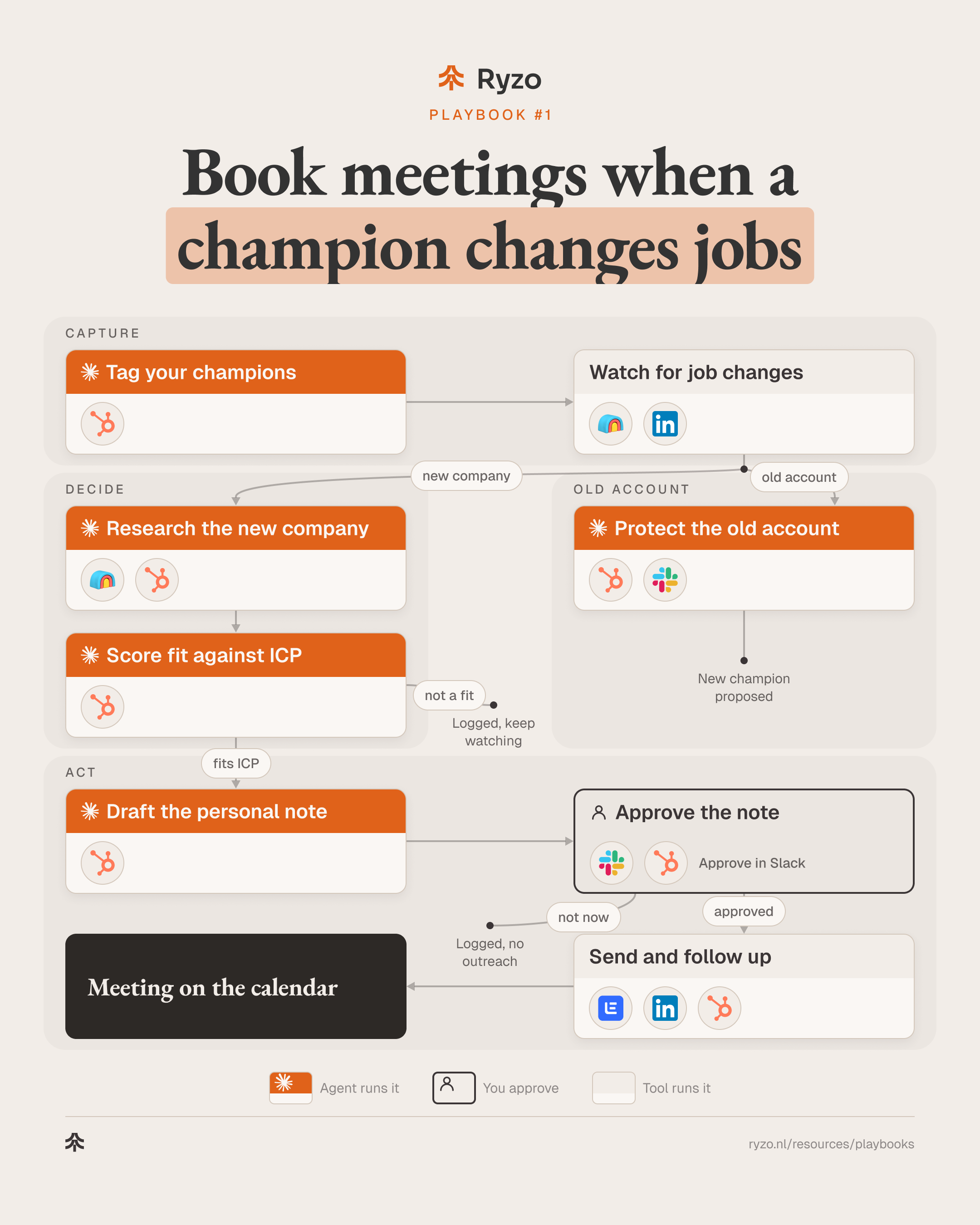
People who used and liked your product are your warmest prospects, especially when they start a new job. In this playbook, agents tag your champions, spot when they move, research the new company and draft a personal note. The account owner approves every message before it goes out, and the account they left gets a new main contact.
- Time to set up
- 1 week
- Difficulty
- Beginner
- Steps
- 8
- For
- B2B SaaS and fintech companies with a base of happy customers
Tools you need

Before you start
- Customers in the CRM with their main contacts, champions and active users
- An agreed ICP to check the new company against
- An owner for these leads, usually the account executive who knows the person
The strategy
A new job is one of the strongest buying signals in B2B. New leaders review their tools early in a role, and someone who already trusts your product skips most of the evaluation.
Most teams know this and still miss the moves, because the work is manual: keeping a champion list current, checking profiles, looking up the new company, digging through old deals before writing a note. That is exactly the work agents do well. They research, sort and draft, every week, without getting bored.
What agents should not do is decide who hears from you. A champion is a relationship, so the account owner reads the brief and the draft and approves, edits or skips before anything is sent. The agents prepare; a person decides.
The same signal has a second side. When a champion leaves, the customer they left just lost the person who knew your product best. The playbook runs both paths from one alert: a warm conversation at the new company, and a new main contact at the old one.
Step by step
- 1
Tag your champions
An agent reads won deals and product activity and keeps your champion list current. Account owners check the list once before the first run.
- Propose champion, decision maker and active user tags from closed-won deals, contact roles and product activity: Claude Code, HubSpot
- Account owners check the list once before the first run: HubSpot
- Keep the tags current after every closed-won deal: Claude Code
ToolsYou end up with: A tagged champion list in the CRM
- 2
Watch for job changes
A weekly run checks every tagged contact for a new role and stores the old and the new company.
- Run the champion list through a job-change enrichment every week: Clay
- Save Sales Navigator leads for the most important champions: Sales Navigator
- Store the old and the new company on the contact: HubSpot
ToolsYou end up with: A weekly list of champions who moved
- 3
Research the new company
For each move, an agent researches the new company and your shared history with the person, and writes one short brief.
- Enrich the new company: industry, size, region: Clay
- Pull the shared history: deals worked on together, calls, tickets, what they cared about: Claude Code, HubSpot
- Write a short brief per person: Claude Code
Tools - 4
Score fit against ICP
An agent scores the new company and the new role against your ICP. Moves that fit go on; the rest are logged and watched.
- Score ICP fit and buying influence of the new role: Claude Code
- Create or update the account and contact: HubSpot
- Log moves that don't fit on the contact and keep watching: HubSpot
Tools - 5
Draft the personal note
An agent drafts a short note and a follow-up in the owner's voice, built on the shared history: congratulate, offer help, no pitch.
- Draft the note and the follow-up in the owner's voice: Claude Code
- Offer something useful: an intro call, a setup checklist, a reference: Claude Code
- Attach the drafts to the contact: HubSpot
Tools - 6
Approve the note
The account owner reads the brief and the drafts in Slack, then approves, edits or skips. Nothing is sent without this approval.
- Slack alert to the owner with the brief and both drafts: Slack
- A follow-up task for the owner: HubSpot
- Approve, edit or skip; skips are logged on the contact: HubSpot
Tools
- 7
Send and follow up
The approved note goes out, the follow-up stops on reply, and everything is logged in the CRM.
- Send the approved email and the follow-up, stop on reply: lemlist
- If the note belongs on LinkedIn, the owner sends it: Sales Navigator
- Log replies and the source 'champion job change': HubSpot
Tools - 8
Protect the old account
From the same signal, an agent flags the account the champion left and proposes a new main contact for the owner to confirm.
- Flag the old account: it just lost a champion: HubSpot
- List who is left and propose a new champion: Claude Code
- Send the proposal to the owner to confirm: Slack
- Review champion coverage every quarter: HubSpot
ToolsYou end up with: The old account flagged and a new champion proposed
How to know it works
- Every qualified job change reaches an owner within a week
- Deals sourced from job changes are visible in the CRM
- Accounts that lose a champion get a new main contact quickly
- The champion list keeps growing with every closed-won deal
Mistakes to avoid
- Tracking only decision makers and missing the day-to-day users
- Sending an automated pitch instead of a personal note
- Chasing every move, including companies outside your ICP
- Forgetting the old account, which just lost its champion
- Letting the champion list go stale after the first setup