Answer every outbound reply while the prospect is still interested
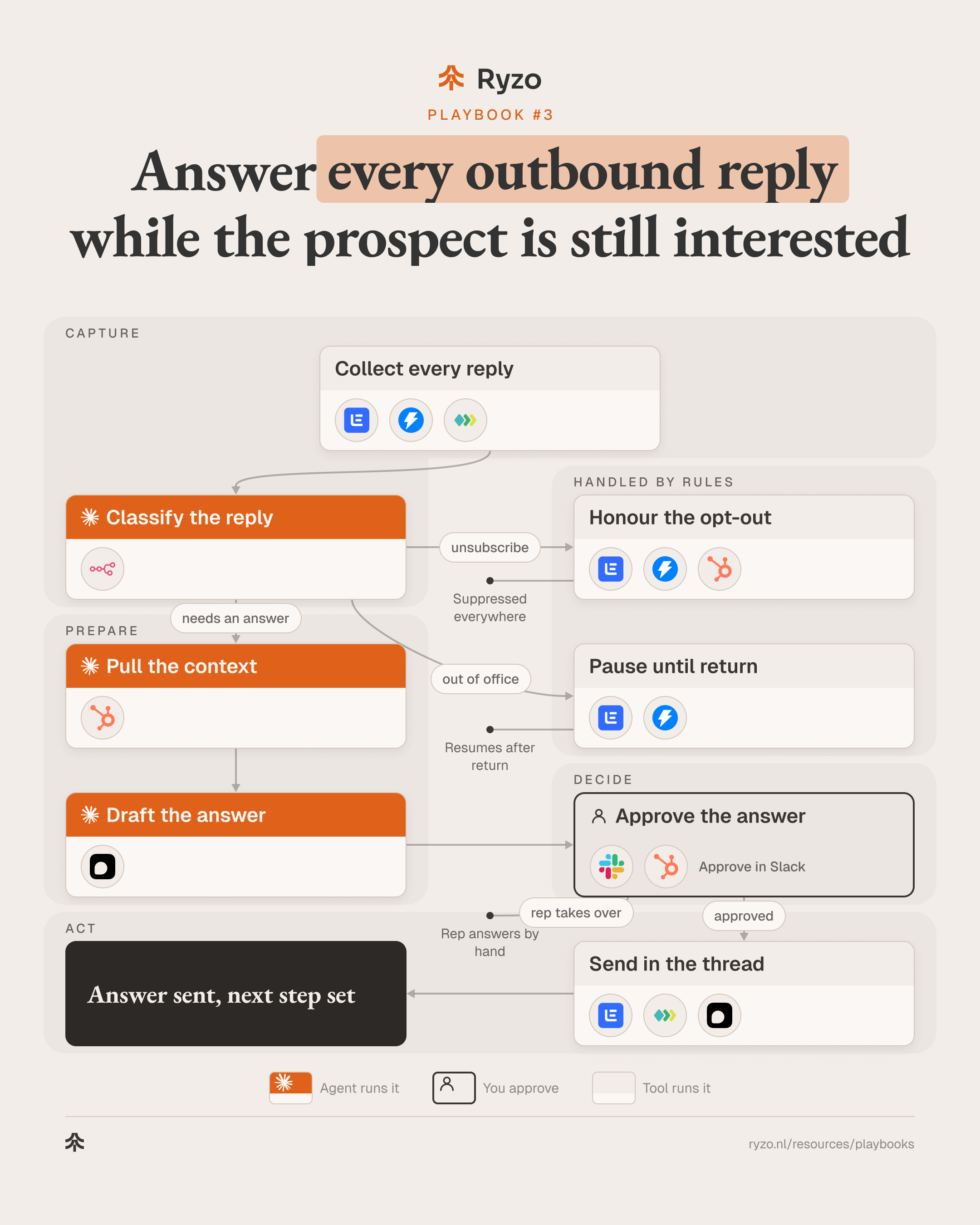
Every reply from email and LinkedIn lands in one queue, where a Claude Code agent sorts it and drafts the answer, with meeting times when the prospect is interested. The rep approves each answer before it goes out. Unsubscribes are honoured straight away, in every tool, without waiting for anyone.
- Time to set up
- 1 week
- Difficulty
- Intermediate
- Steps
- 8
- For
- B2B SaaS and fintech teams running outbound across email and LinkedIn, where replies pile up across inboxes and tools.
Tools you need

Before you start
- Outbound running in lemlist or Instantly, and LinkedIn messages reachable through Unipile.
- A CRM (HubSpot) with a do-not-contact field, and a scheduling tool (Default) that can offer the rep's free times.
- An approved list of answers to the objections you hear most, and Claude Code with n8n to move replies into one queue.
The strategy
A reply is the moment a prospect gives you attention, and attention fades fast. Replies arrive in several sending inboxes, in LinkedIn, at night and on weekends. The ones that wait longest are often the hardest to answer: an objection, a "not now", a question the rep has to look up. Handling every reply from one queue, in one consistent way, keeps the conversation going while the prospect still remembers why they answered.
Agents fit because most of the work is sorting and preparing. An agent can tell an interested reply from an objection, a "not now", an out-of-office or an unsubscribe. It reads the whole thread and the CRM record, then drafts an answer that fits: meeting times for interest, a straight answer to an objection from your approved list, a follow-up date for "not now". The rep starts from a ready draft instead of a blank reply.
The rep decides what the prospect reads. Every answer waits in Slack for approve, edit or take over, and nothing is sent before that. Two things skip the gate on purpose because no message is involved: an unsubscribe is honoured at once in every tool, and an out-of-office pauses the sequence until the return date. When the agent is unsure whether someone wants to stop hearing from you, it treats the reply as an unsubscribe.
Step by step
- 1
Collect every reply
Replies from every sending inbox and from LinkedIn are pushed into one queue the moment they arrive.
- Send email replies by webhook: lemlist, Instantly
- Send LinkedIn replies by webhook: Unipile
- Keep the full thread with each reply: lemlist, Instantly, Unipile
ToolsYou end up with: One queue of replies with their threads
- 2
Classify the reply
An agent sorts each reply: interested, objection, not now, out of office or unsubscribe. In doubt about stopping, it picks unsubscribe.
- Route each reply to the agent: n8n
- Label the reply and give one line of reason: Claude Code
- Read the return date from out-of-office replies: Claude Code
- Note referrals to a colleague: Claude Code
ToolsYou end up with: Labelled reply, routed to the right path
- 3
Honour the opt-out
An unsubscribe stops every sequence for that person straight away and marks them do-not-contact. No draft, no approval.
- Stop all sequences and add to the blocklist: lemlist, Instantly
- Mark the contact do-not-contact: HubSpot
- Log the opt-out with the reply text: HubSpot
ToolsYou end up with: Person suppressed in every tool
- 4
Pause until return
An out-of-office pauses the sequence and resumes it after the return date. Nothing is sent to the prospect.
- Pause the sequence for this person: lemlist, Instantly
- Resume after the return date: lemlist, Instantly
- Pass any named colleague to the rep as a note: lemlist, Instantly
ToolsYou end up with: Sequence paused, resume date set
- 5
Pull the context
For replies that need an answer, an agent reads the thread, the CRM record and any open deal or past conversation.
- Read the full thread and what was sent: Claude Code
- Read contact, account, owner and open deals: Claude Code, HubSpot
- Check for an existing conversation with another rep: HubSpot
Tools - 6
Draft the answer
An agent drafts the answer in the rep's voice: free times for interest, an approved answer to an objection, a follow-up date for not now.
- Offer two or three free times or a booking link: Claude Code, Default
- Answer the objection from the approved list only: Claude Code
- Propose a follow-up date for not now: Claude Code
ToolsYou end up with: Draft answer with proposed next step
- 7
Approve the answer
The rep sees the reply, the context and the draft in Slack and approves, edits or takes over.
- Post reply, context and draft for the rep: Slack
- Approve, edit or take over: Slack, HubSpot
- Nothing is sent without approval: Slack
Tools
- 8
Send in the thread
The approved answer goes out in the same thread and channel, and the next step is set.
- Send in the same email thread: lemlist
- Send in the same LinkedIn conversation: Unipile
- Hold the offered times and log the meeting: Default
Tools
How to know it works
- Time from reply to answer sent, by reply type and by channel.
- Share of drafts the rep sends unchanged, edits or takes over.
- Reply types over time: interested, objection, not now, out of office, unsubscribe.
- Opt-outs honoured in every tool on the same day, checked by sampling.
Mistakes to avoid
- Letting the agent send. An answer in the wrong tone to an interested prospect costs more than a few minutes of waiting; keep the gate.
- Making answers up for objections. The agent should answer only from your approved list and hand anything new to the rep.
- Suppressing in one tool only. An opt-out must reach every sender, inbox and the CRM, or the next campaign contacts that person again.
- Treating "not now" as a no. Log the date they gave and come back then, with a reason that fits.
- Two reps answering the same account. Check for an open conversation or deal before drafting.