Turn every sales call into CRM updates and a follow-up
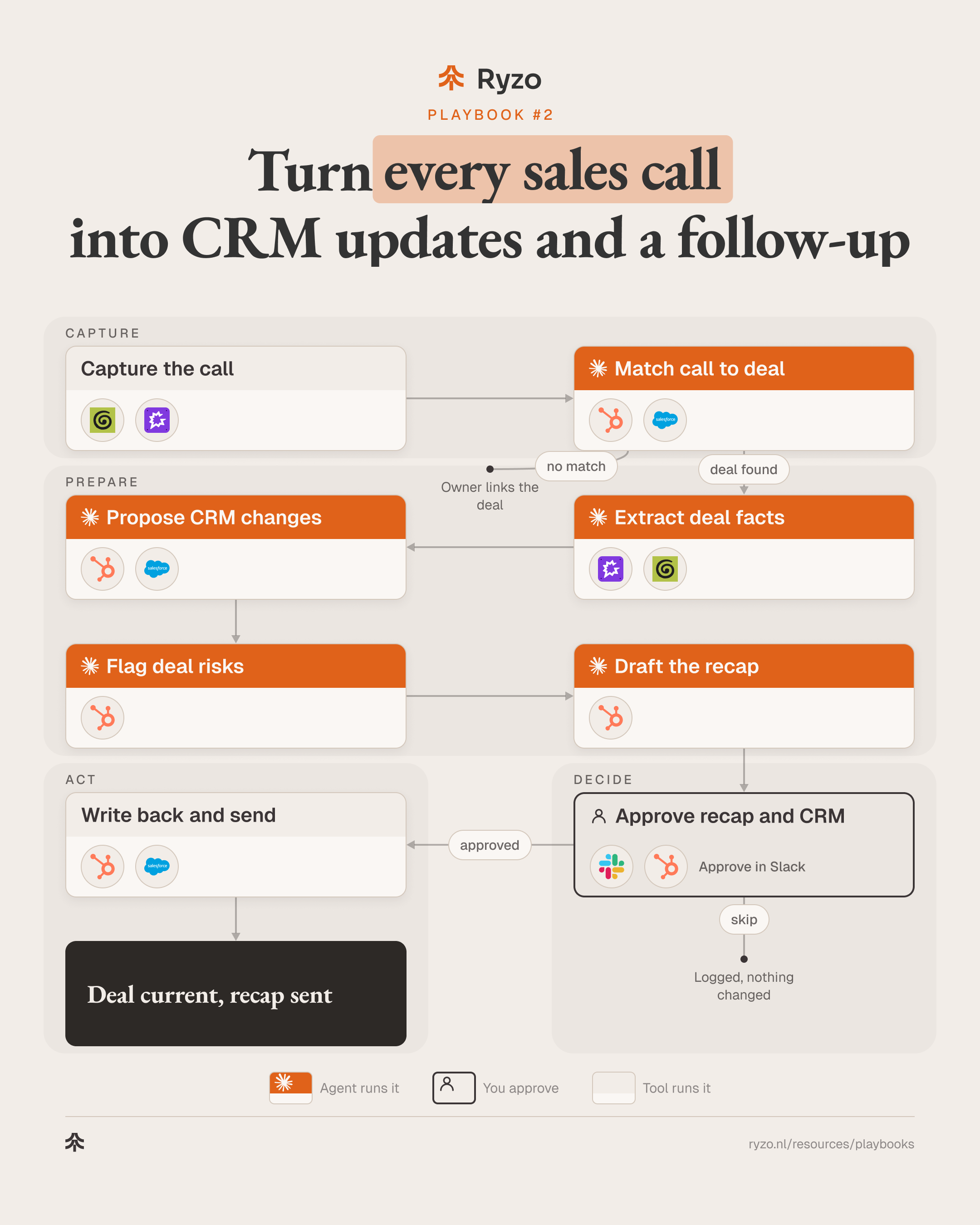
When a recorded sales call ends, Claude Code agents read the transcript, match it to the deal, propose the CRM changes and draft the recap email. The person who ran the call approves both before anything is written or sent. The CRM stays current without anyone retyping their notes.
- Time to set up
- 1 week
- Difficulty
- Intermediate
- Steps
- 8
- For
- Sales teams at B2B SaaS and fintech companies who record their calls and want the CRM and the follow-up to keep pace with them.
Tools you need

Before you start
- A call recorder that saves transcripts (Granola or Gong), with recording consent built into how you book and open calls.
- A CRM (HubSpot or Salesforce) with agreed deal fields: next step, close date, stakeholders, risks.
- Claude Code with read access to the transcripts and the CRM, and a Slack channel or DM for approvals.
The strategy
The truth about a deal is said on the call and then lost on the way to the CRM. Reps write notes from memory, hours later, if at all. Forecasts, handovers and the next call's prep all run on that thin record. Turning each call into a field-level update and a recap, right after it ends, keeps the record as current as the conversation.
Agents are a good fit because the work is reading and sorting, not judging the deal. An agent can listen back to a full call, find the next step, the people involved, the timing and the objections, and point to the quote behind each one. It does the same for the recap email. That is the part a rep skips when the next call starts in five minutes.
The person decides what is true. The agent only proposes: a list of CRM changes next to the current values, the risks it noticed, and a recap draft. The owner approves, edits or skips in Slack. Nothing is written to the CRM and no email leaves until they do. A wrong guess costs one click, not a polluted pipeline.
Step by step
- 1
Capture the call
The call ends and the recorder saves the transcript, attendees and meeting title, then hands them to the agent.
- Record with consent and save the transcript: Granola, Gong
- Send transcript, attendees and title to the agent: Granola, Gong
- Skip internal and personal meetings by calendar rule: Granola, Gong
ToolsYou end up with: Transcript with attendees, ready for the agent
- 2
Match call to deal
An agent matches attendees and company to the open deal in the CRM. No clear match goes to the owner to link.
- Match attendee emails to contacts and accounts: Claude Code, HubSpot, Salesforce
- Pick the open deal, or flag two candidates: Claude Code
- Ask the owner to link it when there is no match: Claude Code, HubSpot, Salesforce
ToolsYou end up with: Call linked to one deal, or a link request to the owner
- 3
Extract deal facts
An agent pulls the facts out of the transcript, each with the quote and timestamp it came from.
- Find next step, timing and decision process: Claude Code
- List stakeholders, their roles and what each cares about: Claude Code
- Note objections, open questions and other vendors mentioned: Claude Code
- Link every fact to its quote and timestamp: Claude Code, Gong, Granola
ToolsYou end up with: Deal facts with sources
- 4
Propose CRM changes
An agent compares the facts with the current deal record and proposes field changes. It reads the CRM; it does not write.
- Read current deal, contact and stage values: HubSpot, Salesforce
- Propose changes as old value → new value with the quote: Claude Code
- Propose new contacts for people not yet in the CRM: Claude Code
Tools - 5
Flag deal risks
An agent checks the deal against your stage rules and flags what is missing or has moved.
- Check stage exit criteria against what was said: Claude Code, HubSpot
- Flag no next step, no decision maker, a moved date: Claude Code
- Note promises the rep made on the call: Claude Code
ToolsYou end up with: Risk list for the owner
- 6
Draft the recap
An agent drafts the recap email in the owner's voice: what was agreed, who does what, the next date.
- Draft the recap from agreed points only: Claude Code
- Match the owner's voice from past recaps: Claude Code, HubSpot
- Leave out internal notes, risks and pricing guesses: Claude Code
Tools - 7
Approve recap and CRM
The owner gets the recap, the CRM changes and the risks in Slack and approves, edits or skips each part.
- Post recap, changes and risks for the owner: Slack
- Approve, edit or skip each change and the recap: Slack, HubSpot
- Nothing is written or sent without approval: Slack
Tools
- 8
Write back and send
The approved changes go into the CRM and the recap goes out from the owner's mailbox, logged on the deal.
- Write the approved field changes: HubSpot, Salesforce
- Send the recap from the owner's connected mailbox: HubSpot, Salesforce
- Log the call summary and create the next-step task: HubSpot, Salesforce
Tools
How to know it works
- Time from call end to approved CRM update and recap sent.
- Share of proposed CRM changes the owner edits or rejects, by field.
- Calls that end without a matched deal, and why.
- Open deals with no next step or no next-step date.
Mistakes to avoid
- Recording without clear consent. Say it at booking and at the start of the call, and follow the recording rules in each country you sell in.
- Letting the agent write straight to the CRM. One misheard date or name spreads into the forecast; keep the approval step.
- Vague deal fields. If "next step" or "decision maker" mean different things to different reps, the agent fills them differently too. Define them first.
- Putting internal notes in the recap. Risks, pricing thoughts and competitor remarks belong in the CRM, not in the email to the buyer.
- Matching on company name alone. Two open deals at one account need the owner, not a guess.