Make Google Ads and LinkedIn Ads optimise for pipeline, not form fills
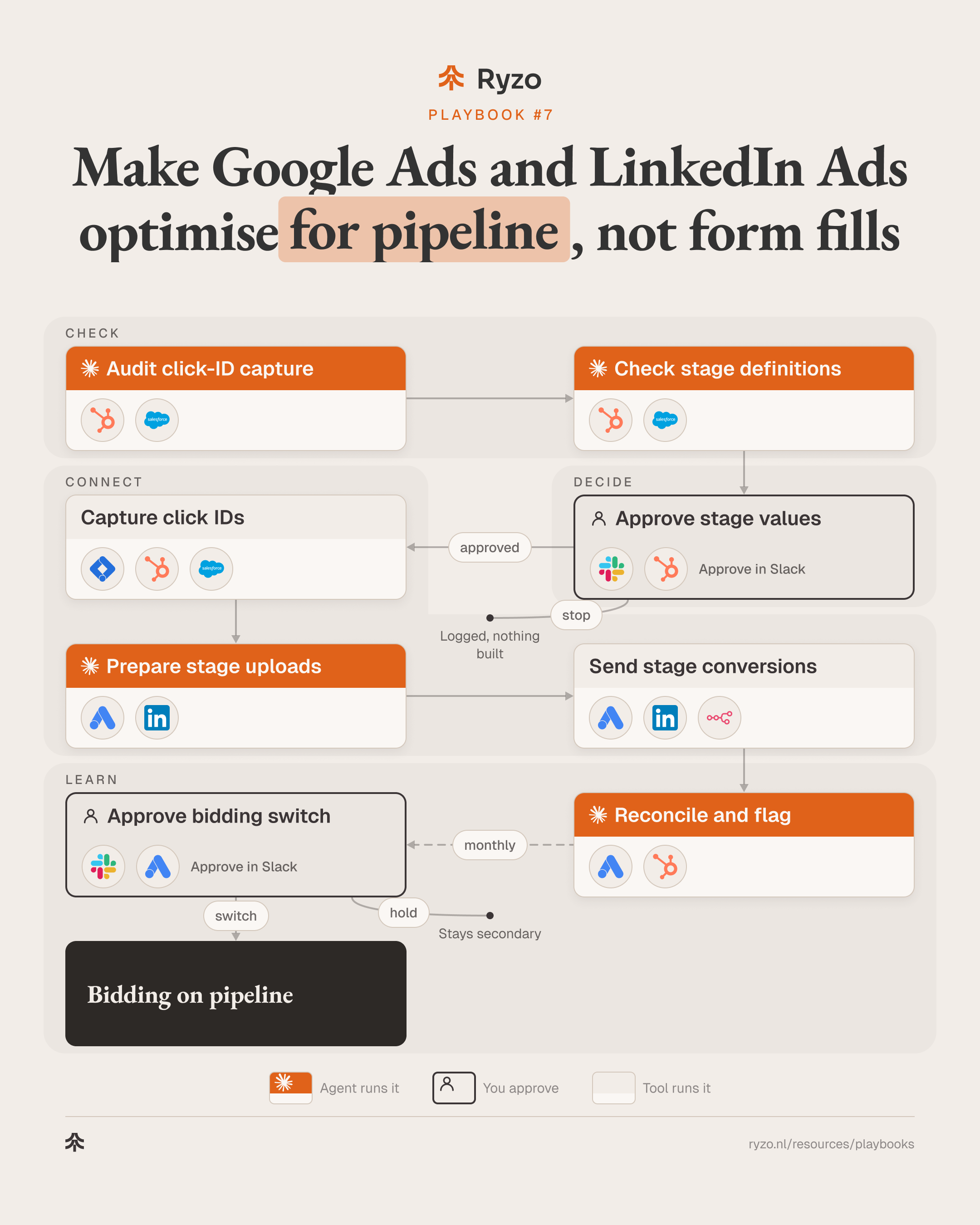
Google Ads and LinkedIn Ads learn from what you send them. This playbook sends the CRM stages that matter, with agreed values, back to both platforms. Claude Code agents audit click-ID capture on every form, check the stage definitions against how the CRM is really used, prepare the uploads and reconcile what each platform received. A person approves the stages, the values and any switch in bidding.
- Time to set up
- 2 weeks
- Difficulty
- Advanced
- Steps
- 8
- For
- Marketing and RevOps teams at B2B SaaS and fintech companies who run Google Ads and LinkedIn Ads and want the platforms to bid on pipeline instead of form fills.
Tools you need


Before you start
- A CRM (HubSpot or Salesforce) with pipeline stages your sales team actually uses, and an owner who can sign off their meaning.
- Google Tag Manager on the site, with consent handled, and edit access to Google Ads and LinkedIn Campaign Manager.
- Claude Code with read access to the CRM and both ad platforms, a way to post scheduled uploads (n8n, Make or Zapier), and a Slack channel for approvals.
The strategy
Ad platforms optimise for the conversion you give them. If that is a form fill, they find more people who fill in forms, including students, job seekers and competitors. The signal that matters, whether that form turned into a qualified opportunity or a deal, lives in the CRM, weeks later. Sending a few CRM stages back to Google Ads and LinkedIn Ads, each with an agreed value, lets both platforms learn which clicks turn into pipeline.
Agents fit the checking and the bookkeeping, which is where this usually breaks. An agent tests every form for the click IDs and UTMs that have to reach the CRM, and lists the ones that drop them. It compares the written stage definitions with how deals actually move: skipped stages, backdated moves, stages nobody uses. It prepares each upload with the click ID, hashed email, stage, value and time, and afterwards reconciles what each platform accepted against the CRM. When match rates drop or stages lag, it says where.
People decide what counts. Which stages are sent, what each is worth and what each one means is a sales and marketing decision, approved before anything is built. New stages are recorded first and kept out of bidding, so bidding doesn't change while the data settles. Moving bidding onto a deeper stage is a second approval, made only when that stage has steady volume.
Step by step
- 1
Audit click-ID capture
An agent checks every form for the click IDs and UTMs that need to reach the CRM, and lists where they get lost.
- List every form and where it sends its data: Claude Code
- Test each form for gclid, li_fat_id and UTM hidden fields: Claude Code
- Check new CRM contacts per form for a stored click ID: Claude Code, HubSpot, Salesforce
- List forms and sources that lose the click ID: Claude Code
ToolsYou end up with: Capture gaps per form
- 2
Check stage definitions
An agent compares the written stage definitions with how deals really move in the CRM, and proposes the stages to send.
- Read stage history for recent deals: HubSpot, Salesforce
- Flag skipped stages, backdated moves and unused stages: Claude Code
- Measure the lag from first click to each stage: Claude Code
- Propose a few stages to send, each with a definition and a value: Claude Code
Tools - 3
Approve stage values
Sales and marketing owners agree which stages are sent, what each means and what each is worth, and approve the capture fixes.
- Post proposed stages, values and capture fixes: Slack
- Agree each definition with the sales owner: Slack, HubSpot
- Approve values, or edit them: Slack
- Nothing is built or sent to a platform without approval: Slack
Tools
You end up with: Approved stages, values and fix list, or a logged stop
- 4
Capture click IDs
Every form stores the click IDs and UTMs in the CRM, and Google gets the hashed email at form submit.
- Store gclid, li_fat_id and UTMs in hidden fields: Google Tag Manager
- Map the hidden fields to contact and deal properties: HubSpot, Salesforce
- Turn on enhanced conversions for leads with hashed email: Google Tag Manager, Google Ads
- Respect consent before any ID or email is stored or sent: Google Tag Manager
Tools - 5
Prepare stage uploads
An agent builds the upload for each approved stage: click ID or hashed email, stage, value and the time it was reached.
- Pick deals that reached an approved stage since the last upload: Claude Code, HubSpot
- Add click ID, hashed email, value and stage time: Claude Code
- Drop rows without consent or outside the upload window: Claude Code
- Validate the file against each platform's format: Claude Code, Google Ads, LinkedIn Campaign Manager
ToolsYou end up with: Validated upload per platform, with a dropped-rows list
- 6
Send stage conversions
The approved stages go to Google Ads as offline conversion actions and to LinkedIn through the Conversions API, on a schedule.
- Create one conversion per stage, kept out of bidding: Google Ads, LinkedIn Campaign Manager
- Import offline stage conversions: Google Ads
- Send the same stages through the Conversions API: LinkedIn Campaign Manager
- Run the upload on a schedule and log each run: n8n, Make, Zapier
ToolsYou end up with: Stage conversions in both platforms
- 7
Reconcile and flag
Every month an agent compares what each platform accepted with the CRM, and flags drops in match rate or changes in stage lag.
- Compare conversions accepted per stage with the CRM: Claude Code, Google Ads, HubSpot
- Report match rate per platform and per form: Claude Code
- Flag rejected rows, missing click IDs and stage lag changes: Claude Code
- Propose moving bidding to a deeper stage once volume is steady: Claude Code
Tools - 8
Approve bidding switch
A person decides whether a deeper stage becomes the conversion the platforms bid on, campaign by campaign.
- Review volume, match rate and lag for the proposed stage: Slack
- Approve or hold the switch per campaign: Slack
- Make the stage primary and change the bid strategy: Google Ads, LinkedIn Campaign Manager
- Log the date of every switch for later comparison: Slack
ToolsYou end up with: Bidding on a pipeline stage, or a logged hold
How to know it works
- Share of new CRM contacts with a stored click ID, per form and per source.
- Match rate per platform and per stage, month by month.
- Conversions accepted by each platform against stage moves in the CRM.
- Lag from first click to each stage, so you know how long the platforms wait for a signal.
- Volume per stage per campaign before and after any bidding switch.
Mistakes to avoid
- Sending stages that mean different things to different reps. Agree the definition first, or the platforms learn from noise.
- Losing the click ID between form and CRM. Redirects, embedded forms and booking tools often drop it; test every form, not one.
- Changing stage values every month. The platforms treat values as truth; change them rarely and log every change.
- Switching bidding before a stage has steady volume. Keep the stage out of bidding until there is enough of it; a thin signal makes bidding swing.
- Counting the form fill and the stage as primary at the same time. Pick one primary conversion per campaign.
- Uploading late. Stages reached after the platform's upload window never count; keep the schedule running.
- Ignoring consent. Store and send click IDs and hashed emails only for people who agreed to it.