Structure an agency so agents do the delivery work
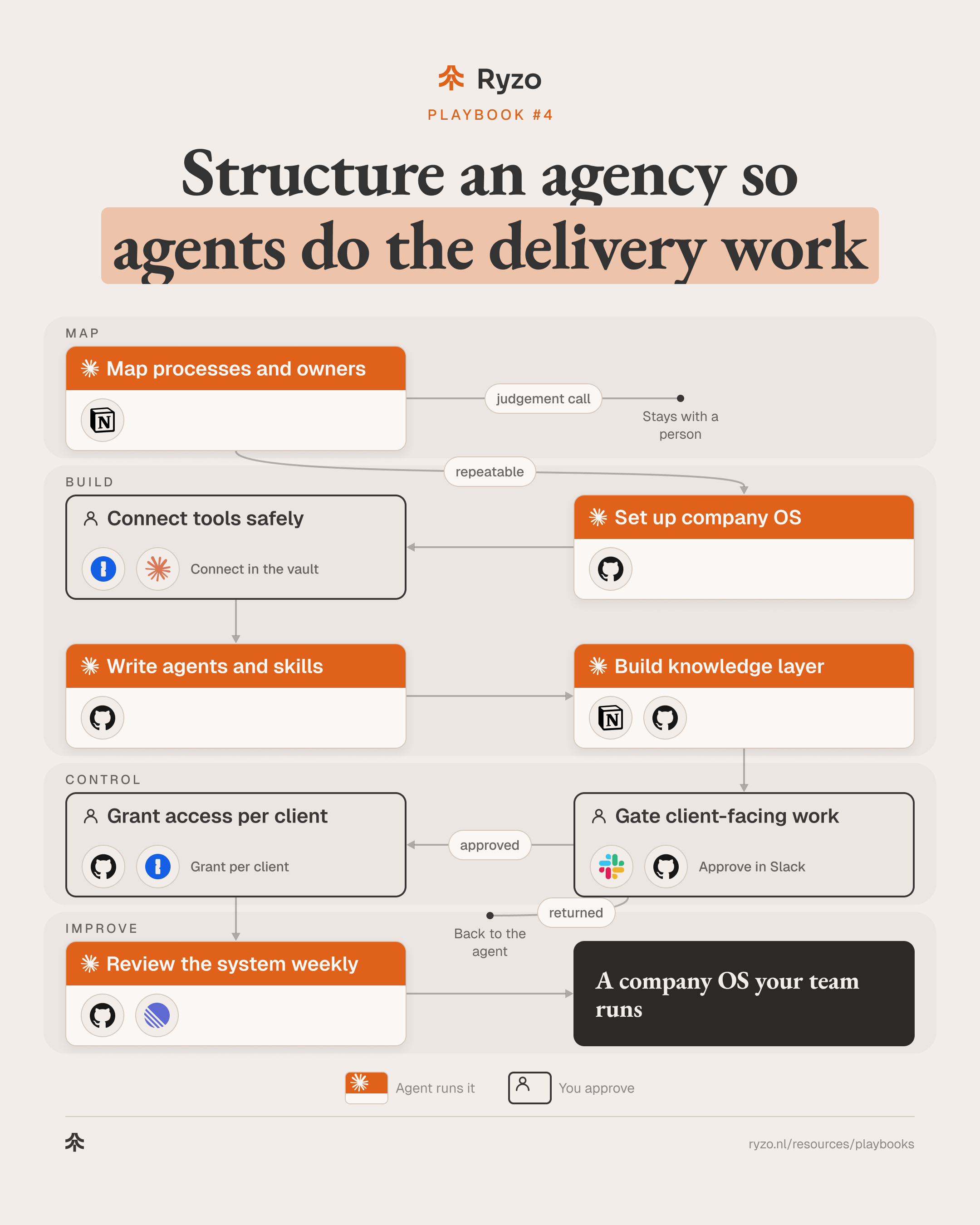
Map the commercial processes and their owners, then put the company in a private repository that Claude Code agents can read: rules, role agents, skills and a knowledge layer. Tools connect through MCP servers and CLIs with their own service identities and keys kept in a vault. Agents draft and run the repeatable delivery work. A named person approves anything client-facing, and access follows who works on which client.
- Time to set up
- 4 weeks
- Difficulty
- Advanced
- Steps
- 8
- For
- Founders and operators of agencies and services firms that run go-to-market for B2B software and fintech clients.
Tools you need
Before you start
- Claude Code for everyone who will run agents, and a GitHub organisation with private repositories.
- A password manager with shared vaults (1Password or similar), and admin rights to create service accounts in your main tools.
- One named owner for the system, and client agreements that say what client data agents may process.
The strategy
In most agencies the process lives in people's heads and in a dozen tools. Agents can't run work that nobody has written down. So the structure comes first: which processes exist, who owns each step, where the context lives and which tools an agent may touch. Put that in one repository and an agent reads it the way a new hire would, on every run.
Agents fit the delivery work because most of it repeats: research, account lists, drafts, CRM updates, reports. Each repeatable step becomes a role agent with its skills, reading the same company rules and the same client context. Behaviour (agents, skills, rules) and knowledge (decisions, client context, playbooks) sit in plain files, versioned and changed through pull requests. Tools connect through MCP servers and CLIs, each with its own service identity and the smallest scope that does the job.
People own the client and every decision that leaves the company. No email, report, ad or change in a client's system goes out until a named person approves it. Access is set per client, so someone on one account sees that account only. A weekly review turns what agents got wrong into rule changes, approved like any other change.
Step by step
- 1
Map processes and owners
An agent drafts an inventory of every commercial process, from first touch to renewal, from your docs, tools and call notes. The founders confirm the owner of each step and mark which steps repeat.
- List per process the people, tools, SOPs and scripts already running: Claude Code, Notion
- Break each process into steps with trigger, input and output: Claude Code
- Name one owner per step: Notion
- Mark each step repeatable, judgement call or client-facing: Claude Code, Notion
ToolsYou end up with: Process inventory with an owner and a type per step
- 2
Set up company OS
An agent scaffolds a private repository that agents can find their way around: a folder per function, knowledge and unsorted inputs, a separate private repo per client, and a CLAUDE.md with the rules every agent reads first.
- Create folders for functions, clients, knowledge and unsorted inputs: Claude Code, GitHub
- Write company rules in CLAUDE.md: voice, approvals, data handling, naming: Claude Code
- Give each client its own private repo: GitHub
- Ignore secret and local environment files from the first commit: GitHub
ToolsYou end up with: Private company OS repository with rules every agent loads
- 3
Connect tools safely
A person connects each tool through its MCP server or CLI, with a separate service identity and the smallest scope that does the job. Keys stay in the vault and are read at run time.
- List the scopes each process needs, read-only first: Claude Code
- Create a service identity per tool, never a personal login: 1Password
- Keep keys in the vault and reference them, never paste them: 1Password
- Register each MCP server or CLI by name and test it read-only before the team uses it: Claude Code
ToolsYou end up with: Tools connected with least privilege, no keys in files
- 4
Write agents and skills
For each repeatable step, an agent turns the SOP into a skill and drafts the role agent that runs it. Each one says what it may read, what it may draft and what it must never do.
- Draft one role agent per job: researcher, analyst, writer, reporter: Claude Code
- Turn each SOP into a skill with inputs, steps and output format: Claude Code
- Write a never-do list into every agent: Claude Code
- Review each new agent and skill as a pull request: GitHub
Tools - 5
Build knowledge layer
Agents keep the context they need in plain markdown files, updated through commits: decisions, client context, playbooks and a shared glossary. Records stay in the CRM, task tool and docs; the repository holds the synthesis.
- Log each decision with date, owner and reason: Claude Code, GitHub
- Keep one context page per client: goals, terms, constraints: Claude Code
- Turn call notes, SOPs and finished campaigns into playbooks: Claude Code, Notion
- Agree one meaning per term across clients and tools: Claude Code
Tools - 6
Gate client-facing work
Anything that leaves the company or changes a client's system waits for a named person. Agents post the draft with its sources; the person approves, edits or sends it back.
- Post each draft with its sources to the owner: Slack
- Approve, edit or return with a note: Slack, GitHub
- Nothing is sent, published or written to a client system before approval: Slack
- Log every approval and every return: GitHub
Tools
- 7
Grant access per client
Each person gets the repositories and vaults for the clients they work on, nothing wider, and learns when to run a skill and when to write a prompt. Freelancers get one client repo. Clients get shared documents, never repository access.
- Invite people per client repo, not to the whole organisation: GitHub
- Share one vault per client, never across clients: 1Password
- Commit hooks that block sends and deletes without approval: GitHub
- Remove access the day someone leaves a client: GitHub, 1Password
ToolsYou end up with: Access that matches who works on what
- 8
Review the system weekly
Once a week an agent reads the approval log, returned drafts, access lists and changed files, and proposes rule and agent changes as pull requests. The owner merges or declines each one.
- Sum up approvals, edits and returns per agent: Claude Code
- Scan files and logs for keys, tokens and client data in the wrong place: Claude Code, GitHub
- Flag access that no longer matches current clients, and files nobody uses: Claude Code, GitHub
- Propose rule changes as pull requests and track follow-ups: GitHub, Linear
ToolsYou end up with: Weekly review with proposed changes for the owner
How to know it works
- Share of mapped process steps run by an agent, approved by a person, or still done by hand.
- Agent drafts approved as is, approved with edits, or returned, per process and per agent.
- Keys, tokens or client data found in files or logs by the weekly scan.
- Access that no longer matches a person's current clients.
- Client context pages not updated since the last change in that client's scope.
Mistakes to avoid
- Writing agents before the process map. An agent copies the process it is given, including the gaps.
- One admin login shared by every agent. Give each tool its own service identity with a narrow scope, so a leaked key opens one door.
- Keys in files. CLAUDE.md, configs, shell history and scheduled jobs all leak; reference the vault and read keys at run time.
- One repository for every client. Client data ends up next to another client's work; give each client its own private repo and vault.
- Approval that turns into a rubber stamp. Keep drafts short enough to read, show sources, and bring returned drafts into the weekly review.
- Agents that edit their own rules. Rule and agent changes go through a pull request the owner approves.